Agents
An agent in Agenta is an assistant you build for a specific job. This page covers when to use an agent, what an agent is made of, how you create one, and how it improves over time.
When to use an agent
You create an agent when you want an assistant that is set up for one job. The job can be broad or narrow:
- A general marketing agent that drafts copy, reviews your drafts, and answers questions about your product.
- A more specific agent that helps with your SEO. It knows your pages, your keywords, and what you already tried.
- An automation, such as an agent that checks your competitors every week and reports what changed.
These three examples come back throughout this page.
The comparison with ChatGPT makes the difference concrete. ChatGPT gives you one prebuilt, general agent. It works with everything, and it knows nothing about your company, your customers, or how you want the work done. An agent you build in Agenta is specific. Its instructions describe the job, and you change those instructions over time until the agent works the way you want.
What an agent is made of
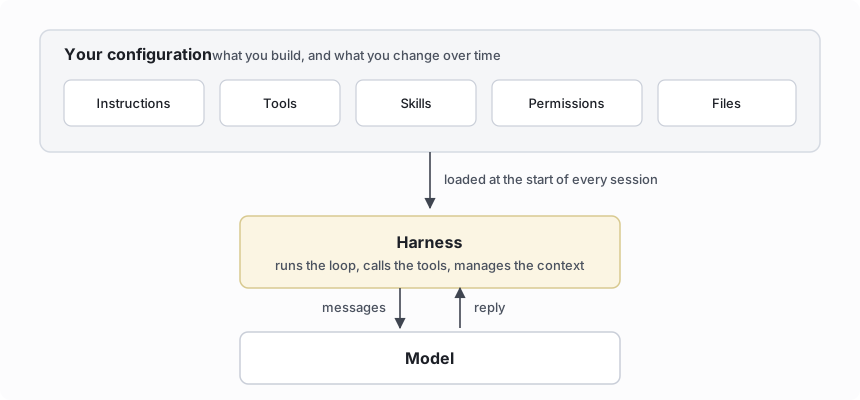
An agent is a configuration you build, run by a harness and a model. The configuration has five parts. Each part has its own page; here is the short version.
- Instructions describe the job. For the SEO agent, they say what the site is, who it serves, and how to report findings.
- Tools are actions the agent can take in other systems. The competitor-watch agent needs web search; the marketing agent might post drafts to Slack.
- Skills are short handbooks for tasks the agent does sometimes, loaded only when needed.
- Permissions decide which actions the agent takes on its own and which wait for your approval.
- Files live in the agent's folder: the drafts it writes, the notes it keeps, the reference material you give it.
Two more parts run the agent rather than define it. The harness is the program that drives the model: it sends the messages, runs the tool calls the model asks for, and feeds the results back. The model is the language model that produces the replies. Both are choices you can change without rebuilding the agent. See Harnesses and models.
How to create an agent
There are two ways to create an agent: chat with it, or configure it yourself.
The first way is to chat. In the playground, a new agent has access to build tools that let it change its own configuration. You describe the job in conversation, and the agent writes its instructions and adds tools and skills as you talk. Build your first agent walks through this.
The second way is to configure the agent directly. Set Playground mode to Build and edit each part yourself: the instructions, the tools, the skills, the permissions.
Agents are versioned and improve over time
An agent's configuration is versioned. Every commit creates a version, and you can read back what changed, when, and why on the Registry page. See Sessions and versions.
Versioning is what makes an agent improve. When the agent gets something wrong, say the SEO agent pulls numbers from the wrong report, you tell it in chat. It updates its own instructions, the change is recorded as a new version, and that mistake does not happen again. After a few weeks of this, the instructions describe the job accurately, because each rule was added the moment something went wrong. Write your agent's instructions covers this loop in practice.
Go deeper
- Instructions: what goes in them and why they stay short.
- Automations: run an agent on a schedule or on an event in a connected app.
- Harnesses and models: the two choices that run the agent.
- Cost and usage: what you are charged for.